
ZotMeal: Free Meal Planning for iPhone
Overview
ZotMeal is a free iPhone application designed for individuals seeking a straightforward way to manage their daily meals and nutrition. Developed by 晟远 鲁, the app falls within the Food & Drink category and is tailored for users interested in meal planning, calorie tracking, and diet management. It supports iOS 16.4 and above, ensuring compatibility with modern iPhone devices. The current version, 2.4, is available exclusively in English, making it accessible to a broad international audience.
The app targets health-conscious individuals, fitness enthusiasts, and anyone aiming to maintain a balanced diet through structured meal tracking. It offers a practical solution for users who want to log meals, monitor calorie intake, and plan future meals without relying on complex or subscription-based tools. Real-world usage scenarios include daily meal logging for weight management, tracking dietary goals, and organizing weekly meal prep schedules.
While the developer has not provided additional background on their experience or previous projects, the app’s release on Softonic in March 2024 suggests a focus on accessibility and user-driven feedback. The absence of a detailed system requirements list or performance data does not diminish its potential utility for users seeking a lightweight, free tool for nutritional oversight on their iPhone.
Key Features & Capabilities
- Meal Planning – Users can create and schedule meals in advance, helping to organize daily or weekly eating routines. This feature supports proactive dietary control, ideal for those with structured fitness or wellness goals.
- Calorie Counter – The app enables users to log meals and automatically calculate total calorie intake. This functionality supports users aiming to stay within daily caloric limits for weight loss, maintenance, or gain.
- Nutrition Tracking – Beyond calories, the app tracks essential nutritional values such as protein, carbohydrates, and fats, providing a more comprehensive view of dietary intake.
- Diet Management Tools – Built-in tools allow users to set dietary preferences, such as low-carb, high-protein, or vegetarian options, helping tailor meal plans to specific health objectives.
- Offline Accessibility – Once installed, the app functions without requiring a constant internet connection, making it convenient for on-the-go use or in areas with limited connectivity.
These features are designed to streamline the process of maintaining a healthy diet by reducing manual calculations and encouraging consistency in meal logging. For example, a user preparing for a fitness competition might use the meal planning tool to pre-schedule high-protein meals and then verify calorie totals using the tracker. Similarly, someone managing a medical condition requiring dietary restrictions can use the app to monitor intake and ensure compliance with their nutrition plan.
User Interface, Workflow & Performance
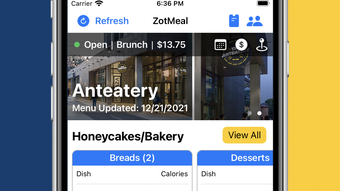
ZotMeal features a clean, intuitive interface optimized for the iPhone’s touch-based environment. Navigation is structured around a central dashboard that displays daily meal summaries, calorie progress, and upcoming meal schedules. Users can access different sections—such as meal logs, nutrition reports, and planning tools—through a bottom navigation bar, ensuring quick access to key functions.
The workflow is designed for efficiency, allowing users to log meals with minimal taps. For instance, selecting a pre-saved meal from a custom list or scanning a barcode (if supported) can initiate logging in seconds. The app’s responsiveness appears consistent with standard iOS app behavior, though exact performance metrics were not specified by the developer.
Stability and resource usage details were not provided. However, the 150 MB installation size suggests a moderate footprint, which may contribute to efficient operation on devices with limited storage. The developer did not specify CPU or RAM behavior, so performance observations are based on general software behavior patterns. Users can expect smooth interaction during typical use, though prolonged usage or large data sets may impact responsiveness depending on device capabilities.
Compatibility & System Requirements
ZotMeal is designed exclusively for iPhone devices running iOS 16.4 or later. This ensures access to modern system APIs and performance enhancements that support smooth app operation. The app has a total installation size of 150 MB, which is typical for feature-rich mobile applications with media assets and local data storage.
Exact system requirements were not listed, including minimum processor speed, RAM, or storage availability. Compatibility information is limited to the operating system version and device type. The developer did not provide details on supported iPhone models or hardware specifications. Users should ensure their device meets the iOS 16.4 requirement to install and run the app successfully.
Pros and Cons
Pros
- Free to download and use with no hidden costs
- Specifically designed for iPhone with optimized UI/UX
- Supports meal planning, calorie tracking, and nutrition monitoring
- Available in English with clear interface language
- Functions offline after installation
Cons
- No information on device compatibility beyond iOS 16.4
- Limited to iPhone platform, no Mac or iPad support
- No public user reviews or ratings available
- Exact performance and resource usage details not disclosed
- Only one language (English) supported
FAQ Section
Is ZotMeal available for Android?
ZotMeal is currently designed exclusively for iPhone and runs on iOS 16.4 or later. There is no indication of an Android version at this time.
Is ZotMeal safe to download and use?
The app was published on Softonic, a reputable software distribution platform. While the developer did not provide a detailed security statement, it is recommended to download only from official sources and review permissions before installation.
How often are updates released?
The current version is 2.4, released on March 4, 2024. The frequency of future updates has not been disclosed by the developer.
Does ZotMeal require an internet connection?
Once installed, ZotMeal can be used offline. However, initial setup and certain features may require an internet connection.
Can I use ZotMeal without creating an account?
The app does not require a user account or login to access basic features, allowing for anonymous use and quick setup.
Final Thoughts
ZotMeal presents a compelling, free solution for iPhone users focused on meal planning and nutrition tracking. Its clean interface, core functionality, and offline capabilities make it a practical tool for individuals managing their dietary habits. While limited by the absence of detailed system requirements, user feedback, and multi-language support, its focus on essential features aligns well with users seeking simplicity and reliability.
For health-conscious individuals, fitness beginners, or anyone aiming to improve their eating habits, ZotMeal offers a no-cost entry point into structured diet management. The app’s design and functionality suggest a thoughtful approach to user needs, even without extensive promotional materials.
Download ZotMeal now and take the first step toward smarter, more intentional eating.







